
Sister Diana over at the always excellent Craftypod has a very inspiring interview with Jennifer Gurecki who uses her screen-printing skills to help raise money for Dolphin, a Kenyan charity that educates African teenagers about rape and AIDS. Unfortunately, the rape of young children is a huge problem in Africa because of the widespread belief that sex with a virgin will cure the disease. Dolphin look like they're doing fantastic work in countering this disastrous myth and providing kids with the education and self defence skills to help protect themselves. Kudos to Jennifer for the money she donates from her handprinted knicker company, Pantyline Productions. Oh, and can I just say - "saving the world through panties" - one of the best taglines ever! Let's hear it for knicker power...
Blog
New Toy!

Kirsty Hall: Valle Crucis Abbey, North Wales
Ooh, nifty. My lovely web designer, Steve, has added a little Flickr plugin to WordPress. It puts your Flickr Photosteam directly underneath the editing text box in WordPress and to add an image to a post you just click on the photo of your choice. I can't believe how quick and easy it was. Let's just hope it actually works when I hit publish!
Isn't it funny, before today I hadn't thought that going into Flickr, picking up and resizing an image took too long, but of course, now I do! You know, I remember the days when it took web pages five minutes to load and I was happy to wait in anticipation of what wonders would appear (why yes, I am old!) and now, I make tutting noises if a page takes more than 20 seconds. Sigh, the faster things get, the more impatient we all become...
The image is from Valle Crucis Abbey, which I visited on my recent long weekend in gorgeous North Wales - just click on the image if you want to see more of my pictures of this rather spectacular ruin.
100 Letters
the heartful blogger has started a project called 100 Letters, that is directly inspired by The Diary Project. I'm so flattered!
She will be sending out 100 proper handwritten letters in a year and she'll be doing a drawing on the back of each. As you can see, her drawing style is quite different from my own.

The Heartful Blogger: Envelope No 1
I wish her every success and hope she enjoys her project as much as I (mostly!) enjoy mine. And now, I really must give myself a small mental kick and go and draw my own envelope...
Making Friends With Google: Part 2
OK, so how do you improve your Google ranking?
The SiteWizard has an excellent article called How to Improve Your Search Engine Ranking on Google. It might be a bit technical for some artists (it certainly lost me in places!) but it'll give you a bit of background about how Google works. Searching for 'improving Google ranking' will give you lots of information along these lines but the SiteWizard article was one of the clearest I found.
My own tips are a lot less technical!
Use your name
You absolutely must link your professional name with your professional online identity. No one is going to be able to find you if you hide behind a pseudonym!
If you start a new blog, use your name in both the blog title and the username. Google seems to pay a lot more attention to the title and the username than it does to your profile, which is one reason why having your own dedicated domain name is such a good idea.
Even if you host your blog or domain on a free site, which tend to rank somewhat lower than dedicated domains, changing the title to include your name can make a big difference. I was mystified when I searched for myself by name last month and discovered that The Diary Project didn't appear on Google until about page 15. It was outranked by far less important sites, where I was mentioned only in passing, and far newer sites, like this one. I just couldn't understand it. Eventually I worked out that although I had my name in the profile, Google wasn't giving it much weighting. I changed the title of the blog from "The Diary Project" to "Kirsty Hall: The Diary Project" and the page ranking shot right up. It's now on the second page if I search just for my name and the first page if I search for my name + art.
Of course, you might not want to use your professional name in all your online interactions – you don’t necessarily want a curator or potential collector to find iffy drunken photos or blog posts where you're talking about your sex life! Remember that your reputation is all you have online and you need to protect it. Have a personal online identify by all means, but if you don't want it to intersect with your professional identity then make sure you avoid ever linking the two. Google is remarkably smart at joining dots. I linked to my Livejournal in a professional capacity twice and it now comes up in searches of me. This isn't disastrous since I don't write about anything incredibly revealing over there but now I always have to bear in mind that someone searching for me in a professional capacity could find and read that more personal blog. Since I don't want to strengthen that Google association, I deliberately don't link to my Livejournal from here (you're welcome to go and read it though).
Switch Things On
OK, this is an area where I'm not strong but you need to make sure that you've got the right things switched on in your blog or website. If you work with a web designer, make sure they've optimised your site for search engines through using keywords. Check your website or blog software documentation and make sure that you're being indexed by search engines. I used this article by Biz Stone to make sure that I had the right settings activated on The Diary Project, which is hosted by Blogger. Even if you're not on Blogger, it's worth a read because there are some good general blogging and promotion tips.
If you are on somewhere like Blogger, definitely make sure you've added your site to their own listings. It really is worth it: I get a steady stream of visitors to the Diary Project because it's in the Blogger listings. I got 55 visits from there in the last month: it's currently my fourth largest source of visitors to the Diary Project and provides more visitors to The Diary Project than this site does.
Use Your Natural Advantages
If you’re working with an unusual technique or imagery or have a less common name, then you’re always going to be easier to find on Google simply because there’s less competition.
Unfortunately if you’re called Joe Blow and you’re an oil painter, then you’re going to have to work a lot harder to stand out. So pick out the things that are unique in your work and use them in your profile and your keywords. To find those things, imagine you've only seen your own work once in a group exhibition. What would stand out? If you're not sure, ask a couple of friends what stands out for them.
Write a snappy profile
Mention the important things in your profile - your name, where you're from (in case someone is looking for artists just in your area), the materials you use, the imagery you use and any relevant keywords that describe your work. Keep it fairly concise, don't use too much art jargon and and try to employ the sort of terms that would be used by someone searching for work that's similar to yours.
Be In More Than One Place
As Andrea pointed out in comments.
"It’s easier to have a strong web presence of course if you’re something of an internet whore."
Why yes Andrea, yes it is!
One reason that I’m all over the front two pages of Google like a cheap rash, is that I’m in more than one place online. I've used my own name in at least five sites of my own, plus other people have written about me or linked to my sites.
Now, getting yourself in multiple places online is something that definitely takes time and effort and since it's complex, I’ll be discussing the most effective ways to do this in later posts. In the meantime, consider upgrading your profile on any sites you're already on if it's appropriate to do so (see earlier point about professionalism). You could also ask any galleries that show your work if they would link to your website. However, I have been told that some commercial galleries frown on artists being online, so you might want to test the waters fairly gently on that one.
Personally, I haven't always done this well, I used to be positively shy and retiring. For instance, I'd been curating for several years before I twigged that I ought to put my name on the posters of the shows! I genuinely felt that I was much less important than the artists and it was 'putting myself forward too much'. So at the moment, I have very little online documentation of the five years of curating that I did, although I'm planning to put together a curating page on this website in the near future. That said, at least one or two of the shows that I curated turn up in Google when you search for me.
Considering that I didn't get paid for any of the curating I've done, I should at least have been getting some major props for it! It's safe to say that I wasn't doing myself any favours when I was hiding behind that bushel and I regret it now. But at the time, I just wasn't emotionally ready to be more forward. Later in the series, I'll be talking about how to promote yourself when you'd much rather hide under the bed clothes - believe me, it's an area where I have plenty of personal experience!
Link to yourself
If you are in more than one place (see above) then make sure that you link back to yourself in your profiles. Don’t make visitors go searching for your blog, website or Flickr account but instead make it easy for them (there’s that mantra again!) by pointing them directly towards the places you'd like them to go.
Google also looks in the text of sites, so using your name, the name of an art project or your other sites in your own blog posts can also make you pop up on Google more often. You could try doing things like labelling your photographs when you blog them (something I've only just started doing). I don't know for sure that it helps but it certainly won't hurt. Plus it also makes it clear when an image is yours rather than another artist's - important on a blog like mine where I blog both kinds of images, sometimes in the same post.
Linking to yourself in this way also ups your Technorati numbers. Technorati works by giving you a popularity ranking; you start out low and the more sites that link to you, the higher your ranking rises. Now, obviously you shouldn’t try to artificially boost your Technorati rank by linking to yourself more often than is necessary. However, there’s nothing wrong with pointing people at your other sites if it's relevant to what you're talking about or when there's new content over there. It's not manipulative or 'too in your face' unless you're either sneaky or make a big song and dance about it: instead just think of it as being helpful, both for them and, admittedly, for you. Regular visitors will just ignore the hot link but new visitors won’t be left wondering 'hey, what's this other thing they're talking about?'
Start A Blog
If you don't already have one then start a blog.
Blogging improves your Google ranking in several ways.
Firstly, it means that your site has fresh content. Google and the other search engines prefer newly updated sites: a site that’s been updated recently will tend to place higher than a static site that hasn’t been touched in a couple of months or even years.
Secondly, if you’re blogging then you’re usually linking to other people and they’re hopefully linking back to you. I’ll cover this more in more depth in the articles on blogging but suffice it to say that links are very good. The Google spiders love links - it is called the web after all - so the more little threads you have going in and out of your site, the more visible you are to those spiders.
Be Patient
You won't appear in Google instantly so don't be disheartened if you don't see changes overnight. You can help yourself by doing the things I've mentioned but the web is a big place and those little spiders, although surprisingly fast, can sometimes take a bit of time to find you.
If you haven't seen any change in a couple of weeks then reconsider your options. Look at your Google Analytics and Technorati results again, see if you can spot where you're missing out. Keep testing, do more research, do more reading and try new things. Go back and search for yourself in Google again and note any changes. However, be aware that something like building up a blog takes time; you won't instantly get hundreds of visitors unless you're already famous - in which case, you should probably be writing this series instead of me!
Get more help
If you'd like more information about building your online presence, check out the free resources section.
I am also available for online consulting if you need one-on-one help.
Making Friends With Google: Part 1
The next few articles in the Artists Online series are going to be about improving your search engine visibility. I should point out that I'm not an expert on this, so I'd recommend that you do additional research.
Set a baseline
This should be your first step because simply put, if you don't know where you currently are, you can't know whether you're improving or not. It can also help you spot any obvious mistakes that you're making - I just spotted one of mine!
So, indulge your ego and go type your name into Google.
Try the following versions:
"Your name"
"Your name" + art
artist + your medium + your geographical area
artist + something unique about your work
What do you find? Are you on the first or second page? That's good, you're pretty visible but if there's a lot of variation between the different search terms you might still have room for improvement. If you doesn't appear until 20 or 30 pages into Google, then unfortunately you're effectively invisible because only the most determined person is still hunting for you. Even 10 or 15 pages down is bad because people can be pretty lazy when searching online.
Take a note of the most and least effective ways in which you appear. Try to think of other ways someone might search for your work and test those too.
If I type "Kirsty Hall" into Google then I come up as 5 results on the first page and 10 out of the first 20 results. That's 50%, which isn't bad but if I type "Kirsty Hall" + art, then 19 out of the first 20 results currently refer to me. When I'm searching for an artist, I will generally add the word 'art' to help rule out the non-artists who share their name so clearly a curator who already knows my name has an excellent chance of finding me online.
If they don't know your name it's always going to be harder but it can be done if they've seen your work and remember something distinctive about it.
The search terms, 'artist + pins + sculpture' will bring this site up on the first page. However, if someone has only seen my work with string, then I'm in trouble because I don't appear in the first ten pages of Google at all if you use the search terms, 'artist + knots + string'. I'd just better hope they add the magic word 'sculpture' because that shunts me right back up to the front page!
The search terms 'artists + drawing + envelope' bring me up as the very top result on the first page - how lovely. Unfortunately, only I would know it was me because my name isn't mentioned in the little blurb - instead the words, "Each day in 2007 I am doing a drawing on the back of an envelope, ..." appear. Now that might be enough for someone to identify the Diary Project if they've heard of it before, but to me it instantly says, "oops, I need to change that profile".
Remember my 'Make It Easy For People' mantra from the Flickr posts? Well that applies here too. You need to make it easy for people to find you but you also need to make it easy for them to recognise you when they do find you. While someone might not remember your name well enough to type it into Google, it's quite likely to ring bells if they see it written down.
Being found when someone knows absolutely nothing about you is always going to be the hardest thing to achieve. Despite the fact that I list where I'm from and what I do in most of my online profiles, typing 'artist + Bristol + sculpture' doesn't bring me up until the 19th page of Google. Now, obviously, there's a lot more competition when you're using more general search terms so it's always going to be more difficult to get top results but I clearly need to do some work in that area.
Chart Your Progress
If you already have a website or blog then sign up with Google Analytics and Technorati right now. You can see how many visitors you're getting, which sites are referring them and which other blogs or sites are linking to you. Monitoring your numbers from the beginning means that you can see when things start to improve, which is always encouraging.
Plus being signed up to Technorati can provide a small but steady stream of visitors, in addition to highlighting who has linked to you and in which post. The incredible detail in Google Analytics can help you to work out why things have improved, as well as being endlessly fascinating in its own right. For example, I've just spotted that this site has suddenly had 12 visits from Etsy, which is somewhat mystifying since I'm not even on Etsy. I can only assume that someone from there has linked to me (if you're from Etsy, please do tell me how you got here, I'd love to know).*
Every so often, type yourself into Google to see if your rankings have changed. Don't just look at where you place, look at how often you place. What you're aiming for is to appear in the front two or three pages, over and over again.
Right, now that you've worked out how things stand at the moment, it's time to work on making things better. Don't be disheartened if you're pretty invisible right now, you can make improvements fairly quickly.
* EDIT: Aha, mystery solved. Thanks to Tina Mammoser for pimping me on the Etsy forums.
EDIT: Leonardo Bjork points out that putting your name in quotes can make a big difference to your Google results. Since most searchers know to do that, you should make sure you try it when you run your Google tests.
Get more help
If you'd like more information about building your online presence, check out the free resources section.
I am also available for online consulting if you need one-on-one help.
Kate Fletcher
Ullabenulla is a good art blogger who always seems to find inspiring links and images. Her latest post about gloves, features this lovely piece by Kate Fletcher.

Kate Fletcher: The Glove Laid Bare
Kate describes the work, thus:
"A pair of pristine white 1950’s gloves was a very beautiful and – aspirational thing for women of that time, although they often belied the work worn hands they hid.
I have turned the gloves inside out, dyed them with Eucalyptus cordata, stitched them, embellished them, so they are presented in a more raw and honest light, accentuating the more limited mould of their origins."
I just love this piece - the idea of ageing something, turning it inside out and revealing the hidden centre, both physically and emotionally, appeals to me so strongly.
Unfortunately, I can't find any real information about Kate Fletcher, she has another piece of work on the same website and she seems to be based in Tasmania, Australia but that's it. Kate, if you happen to find this blog entry and you do have a website, let me know and I'll happily link to it.
It kind of proves my point though, doesn't it - artists need to have more information about themselves easily available online. While I don't mind spending ten minutes looking for information on artists, it's much easier for me to promote you if you pop up in Google straight away. And if you don't have a website at all, then you're definitely missing out on a lot of potential publicity from other artist bloggers. I have to go off and do this evening's Diary Project envelope but then I think I'll start looking at how to improve your Google rating, since it's something that several people have asked about.
Annie Ok
I just randomly found Annie Ok's work on Flickr. I find her Flickr is a slightly easier way to see her work than her official website.

Annie Ok: 11-06
I love her use of thread, although it reminds me that it's way past time for me to get back to my own Thread Drawing series.

Kirsty Hall - Mnemonic, January 2007
Does Flickr Work As A Promotional Tool?
Short Answer
Yes!
Long Answer
Flickr can definitely reap big rewards in promotional terms with only fairly small investments of time on your part.
I know that posting to groups works because whenever I post an envelope drawing to even a single Flickr group, I always get a spike in my Diary Project numbers. I've had Google Analytics running over on The Diary Project for exactly one month now (I was using a less accurate site meter before then) and in that month I've had 89 direct referrals from Flickr. Posting an image to a group or taking part in a group discussion also often results in someone adding me as a contact, commenting on my photos or finding their way over here.
But that's not the end of the story...
Just this week I had a timely example of how effective Flickr can be when Jeffrey Yamaguchi from 52 Projects promoted my work without any direct contact from me. He had seen an envelope image that I'd posted to his What's Your Project Flickr group, investigated it and then very kindly blogged about The Diary Project.
Now, I've been meaning to write a press release about The Diary Project and send it to various sites but I hadn't quite got round to it yet - er, you know how it is!
52 Projects was on my list of places to send a press release to because I'd read Jeffrey's book and thought The Diary Project might appeal to him. Now, thanks to Flickr, I don't need to send a press release to that particular site.
It was the work of about 30 seconds to post one of my envelope images to the What's Your Project group, it was certainly much easier than writing a press release, looking up Jeffrey's contact info and sending an email. And frankly, it was also less intimidating: posting images to Flickr groups is brilliant for an artist who hates doing promotion because it doesn't feel like marketing. I don't know about anyone else but I always feel a bit embarrassed writing and sending out press releases about my own work (come to think of it, that's probably why I've been procrastinating on the damn thing for so long).
The Diary Project has already had 91 visits from 52 Projects and who knows, maybe some of those visitors will choose to link to the project in their own blogs. So, if we add those two sets of numbers together, you can see that Flickr has provided 180 visits to The Diary Project in the last month with very minimal effort on my behalf. All I did was upload my Diary Project images (something I had to do anyway) and then send a couple out to groups. I don't know how many images I posted to groups but it's unlikely to have been many since I only do it when I remember so it's a little erratic! My promotional investment was probably about five minutes, tops.
However, it is important to note that all the images had the relevant info on them; a concise bit of blurb about the project and a link to the project blog. Without that information, the envelopes are just more drawings amid a mass of art images: knowing the context of the project is what makes them stand out and having the link right there on the image is what encourages people to find out more.
I've had more unusual Flickr contacts too: Garrison over at Holiday Pad Magazine found this site earlier in the week when one of my non-art photos tagged with the word 'holiday' popped up on the rolling feed at the bottom of his site. He tells me it was my recent taxidermy photos that piqued his interest because he couldn't work out why on earth they were tagged as holiday pictures.

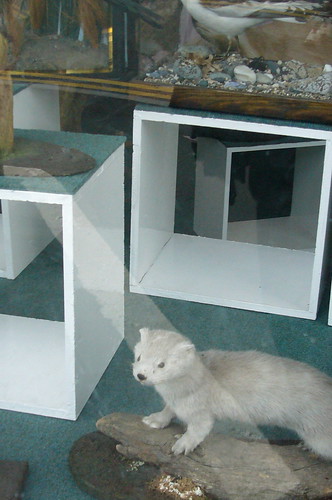
Click on the images if you want to find out why I have taxidermy pictures in my holiday photos!
I guess you just never know what's going to attract someone to your site...
You know, I'd been on Flickr for about 6 months before I even started using groups. The first group I joined was a knitting group and it was another couple of months before I suddenly thought, 'hey wait, maybe there are some art groups...'
Up until that point, it had honestly never occurred to me that Flickr could be a promotional tool (I'm slow sometimes...) but using Flickr groups has revolutionised the amount of interest people take in my work, as well as massively increasing my own enjoyment of the site.
Well then, that's a fairly thorough round-up of Flickr and why you should use it. I hope it's been helpful and that you all come to grips with it a bit quicker than I did! I'll probably come back to it at some point but now the series is going to be moving onto other ways for artists to use the web. I haven't quite decided what's up next but I've got several pages of notes at this point and about 20 different topics to cover, including some thoughts that have come up in the comments. My notes keep expanding too, I thought the Flickr topic would be just one post but it seems to have stretched into five.
Get more help
If you'd like more information about building your online presence, check out the free resources section.
I am also available for online consulting if you need one-on-one help.
Making The Most Of Flickr: Part 2
People on Flickr tend to be an easy audience for an artist to engage with because, by definition, they're already interested in photography and that often spills over to an interest in other visual areas. People on Flickr usually LIKE looking at other people's photos and they're used to doing it.
Ah, a sympathetic audience - the battle is already half won!
You can engage people even further by posting strong shots of your work - use unusual angles, take macro picks, shoot your work in interesting lighting conditions and post research photos that show what inspires your art. Flickr people have a tendency towards visual literacy and they'll respond well to good photography. We all know that it can be hard to take good descriptive photos of your work - the sort of photos that you need for applying for exhibitions. However, I've found that taking more atmospheric shots, especially close-ups, is a lot easier and it tends to be those sort of shots that people on Flickr respond to because they're more photographically interesting.
Flickr is a powerful social network and this is why I recommend it over other photo hosting services. Flickr currently has 4,000,000 users and almost a billion photos hosted on the site. That might sound daunting - with those numbers, who on earth is ever going to see your work? Well, thankfully, Flickr is set up in such a way that it's easy to share your work and make connections with sympathetic people.
There are lots of ways to be more visible on Flickr but basically you need to reach out and participate in the community. You can do this by:
- Adding people as contacts
- Joining Flickr groups
- Commenting on individual photos
- Marking other people's photos as favourites
If you do some or all of these things, then other people will usually start looking at your photos.
Make Contacts
Making contacts is an excellent way to start creating a little network of like-minded people on Flickr. It's a very informal process; you don't need to already know someone beforehand, it's fine to add someone simply because you like their photos. Very often people will add you back but it's not obligatory, so don't be offended if they don't. If someone is listed as a contact then you'll see their photos on your front page. If they add you back, then any new work you put up will automatically appear on their page, either on their front page or their contacts page. If you're regularly posting photos then all your contacts are getting regular little updates on your art and being reminded about your work in a very gentle and non-invasive way.
So where can you find some people that you like?
Well, it's likely that some of your existing friends are already on Flickr, if they are, then add them as contacts. You can also send invites to friends and family who aren't already there. That should give you a bit of a start in creating a network but if you want to find a wider range of people with similar interests to yourself, then the best way is to join some Flickr groups.
Flickr Groups
Groups are one of the fundamental building blocks of the community side of Flickr. Most groups are a combination of discussion and photos: you can post your images to a place where they'll be seen by hundreds of other people but you can also take part in the discussions, which are a good way to meet individuals.
There are groups on just every subject under the sun and most of them are open membership so you join with the click of a button, very occasionally you'll have to ask a moderator to join.
Consider joining some of the art groups: Artists And Their Art is my favourite because I like their discussions but there are masses of others. You might not like a lot of the work that gets posted to the general art groups, I certainly don't, but there are interesting artists active in some of the discussions. Also, posting photos to a group isn't like being in an exhibition, where you're often judged by the company you keep, it's far more like putting a promotional postcard up in a huge display. Of course, you should still use your discretion - if you hate everything that's posted to a group and the discussions don't appeal, then it might be better to walk on by.
Does your work use a particular technique, image, theme, style or colour? Then there's probably already a group on Flickr that covers it and if there isn't, you can always start one. I'm on a wide range of Flickr groups (61 to date - it's easy to get a little bit carried away!), from the more obviously arty ones to more unusual ones like wabi sabi suki, Coiled Knotted Twisted and Keys Keyholes Locks. Obviously it's impossible to keep up with a huge range of groups: I have a couple that I'm more involved with and just randomly dip in and out of the rest.
When posting images to groups, obey the rules; many groups limit the number of images you can post in a day and off-topic images are likely to be deleted by the mods. Even if a group has unlimited posting, don't post huge clumps of your work to a single group all at once because it drowns out everyone else's work. However, picking an image that you like and posting it to more than one group is completely fine. Personally I try to pick a wide variety of applicable groups for individual images so that I'm reaching a wider potential audience. I also do this so that I don't bore people. The same people often belong to all the groups about a single subject, therefore, to make things a bit more interesting for those people, I post different images from the same series to each of the related groups.
You can find groups by using the search tool on your Flickr page, you can search for groups, people, locations or through your own or everyone else's photos. The Flickr search engines works by searching for tags, which is why you should be using them on your own photos, otherwise you're effectively invisible to the search tool and consequently to other users.
Comments
It's perfectly acceptable to comment on someone's photo even when you don't know them. There's no need to feel shy, just dive in. The person will see that you've added a comment and the comment will usually be publicly available on that photo for others to read. Adding comments usually encourages people to come over and have a look at your work.
Obviously nasty comments are very unprofessional and aren't going to make you any friends: as my father likes to say; "if you can't say something nice, don't say anything at all!" Just ignore the stuff you don't like, there's no requirement to comment on every single thing you see (you couldn't anyway, it would be a full time job!)
Constructive criticism might be fine, especially if you've already connected with the person and know that they're open to it but the culture of commenting on Flickr is generally positive and you should bear this in mind. If you want brutally honest responses on your own work, then you'll probably need to explicitly ask for it in the text of the photo. If you happen to get a troll who hates your work and is just being abusive in comments, you can block them. It's never happened to me but if you're making more controversial work then it could be an issue.
When someone has left a comment on my work, I try to drop them a quick 'thank you' via FlickrMail, especially if they're a new commenter. I like the FlickrMail tool because it means that as well as taking part in the big group discussions, you can have personal side conversations with people. It helps to break up the vastness of Flickr and make it a lot less overwhelming.
Favourites
This is the Flickr tool that I use least but it can be useful. It's basically an extension of commenting: you mark other people's individual photos as favourites and they're then stored on a favourites page on your own page.
Where I have found favourites to be helpful is in finding new people: I've often found interesting new artists by going to the page of someone whose work I like and browsing through their favourites and contacts pages.
The Culture Of Flickr
I hope it's clear by now that Flickr doesn't need to be a dauntingly huge place where you're destined to be invisible but can be a place where, with a little effort, you and your work can be seen and respected.
You shouldn't go into it cynically though - regarding the other members of Flickr as just another marketing opportunity won't go over well. It's rude, disrespectful and contrary to the ethos of the place. Flickr isn't just a huge potential audience for your work; it's a community and you'll be a member of that community. Respect the other members and respond to them with openness and generosity.
Flickr is about sharing and being generous with your time, energy and creative thoughts can reap big rewards there. Every time you make someone into a contact, comment on or favourite one of their photos or write something interesting in a discussion, people are likely to come and see who you are - they'll read your profile and have a quick look at your work. If you're lucky (and you've made it easy for them), they might also go on to visit your other websites or act as an advocate for your work by blogging about you.
Sorry about the length of this one, there didn't seem to be a good place to cut it in half and there was a lot to say. We're nearly done with Flickr posts now though.
Get more help
If you'd like more information about building your online presence, check out the free resources section.
I am also available for online consulting if you need one-on-one help.
Making The Most Of Flickr: Part 1
I always describe Flickr as 'simple but deep' and that's a good way to think about it. I've already explained that I like the intuitive interface, however, there's a lot more to Flickr than ease of use. I'm still coming to grips with what you can do over there but in my experience, the more you delve into Flickr, the more there is to find.
If you just use Flickr as somewhere to store your images so that you can blog them elsewhere then you're definitely not realising its full potential. Today I'm going to run through a few ways for artists to make the most of Flickr, all of which relate to the powerful communal aspects of the site.
OK, first let's quickly check what you should ideally have on your own Flickr before you start engaging with the Flickr community.
The first thing, as usual, is to make sure your actual work is up to scratch. Post good, strong interesting images of your art. Work in progress shots, clearly marked as such, are also perfectly acceptable - indeed, people usually enjoy seeing those. However, if Flickr is your only online visual portfolio, you may want to keep it a bit more formal and only post finished works.
Now sort your images into collections and sets: you can sort by date, by medium, by series or by any other criteria that makes sense to you. Once you've got the sets and collections you want, set up your front page so that your art collections and/or sets are visible alongside your photostream. This means that anyone clicking on your profile or one of your photos will instantly be able to see that you're an artist and exactly where your art images are. Always make it easy for people!
You also need to have explanatory text under each photo. Obviously it's best to do this when you upload images but if you didn't have time then it's easy enough to do it afterwards either by clicking on individual photos or, if you've got a lot to do, by using the batch organize button in the Organizer feature. When writing the text don't use too much art jargon and be reasonably concise. However, people often like to know a bit about the reality behind the art so it's fine to tell stories or to explain why this is a favourite piece of work.
If you have an art website or blog, then make sure that you include a link in the text of every single photo as well as in your profile. Having a direct html link from individual Flickr photos makes a big difference to the numbers of visitors you'll get to your website: Flickr is my largest source of visitors to The Diary Project blog because there's a direct link on every single envelope image. I'm currently running a small comparative experiment on this. Last night I checked my numbers in Google Analytics, took a note of them, then added a direct link to this site on all the art images that aren't Diary Project images. I'll let you know in a week or two how much difference it makes.
As I mentioned yesterday, your profile should contain an artists statement and/or a mini CV; a link to any other art websites; plus a way to get in touch with you, although you don't have to give out your full address if you're uncomfortable with that. Do think long and hard before putting your home address or phone number online because once it's out there, it will stay out there. I'd recommend putting a rough geographical location though, it helps to orientate people and would be helpful if someone was looking for artists in your particular area.
OK, your Flickr account should now look presentable, although if you haven't done absolutely everything on every single photograph, don't worry over much. My own Flickr follows most of these principles but it isn't absolutely perfect and I don't let it stop me taking part in the wider Flickr community. At some point I need to go through and make sure that I'm following my own advice and everything has the correct tags and explanations!
Right, on to Part 2, where I'll explain how to get started in the community side of Flickr.
Get more help
If you'd like more information about building your online presence, check out the free resources section.
I am also available for online consulting if you need one-on-one help.